
Welcome to the CARD Online Course Support Page
To ensure smooth progress through the lessons, we recommend:
- viewing the course on a desktop computer, not a smartphone,
- at a location with fast internet service (and strong wi-fi signal), and
- closing all other applications, programs, or windows for best performance.
We offer on-demand courses to complete at your convenience.
For a guide to navigating your course, select the appropriate link below:
Click here for a guide to these slide-based courses
- Montessori Dementia Care Professional
- Determining Cause and Effective Treatment for Responsive Behaviors
- Creating and Managing Resident/Client Committees
- Resident Activity Leaders
Click here for a guide to these video-based courses
- Montessori Principles for Leadership and Staff Engagement
- 12 Key Principles of Montessori Inspired Lifestyle®
Courses based on Activity Manuals include an e-book download. The online course only includes a quiz to complete for a certificate.
Click here for a screenshot showing where to find the e-book for Montessori Based Activities for Persons with Dementia Volume 1 & Volume 2

Additional Support and Answers to Commonly Asked Questions
Issues with Registration and Enrollment:
| PROBLEM | SOLUTION |
|---|---|
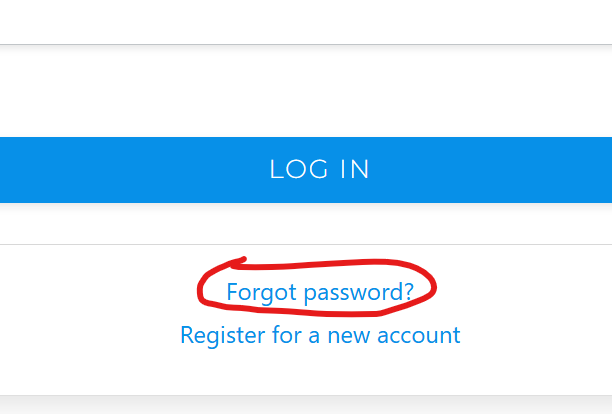
| I don’t remember my password. | You can reset your password on the login page by clicking “Forgot Password”. A reset link will be sent to your email. If you do not receive it, please check your spam folder. Click here for a screenshot showing where to find the link. |
| I haven’t logged in for a long time and this looks different than I remember. | As of April 2024, we upgraded to a new Learning Portal. Course records were transferred for anyone who had logged in after January 1, 2022 and can still be accessed using the same login information as before. If this is your first time on the new site, you will need to reset your password. Do NOT create a new account if you had an account in the previous platform and logged in after 1/1/2022. |
| I changed my password, but when I try to log in it says, “Something went wrong, please try again.” | There are various reasons for this message. Here are a few solutions to try: 1. Clear your browser cache and cookies (Click on your browser name for instructions on how to do this: Google Chrome, Apple Safari, Microsoft Edge, Mozilla Firefox). 2. Ensure your username and password are entered correctly, paying attention to case sensitivity. Try setting a stronger password, or send us a message at info@cen4ard.com to try another method. 3. If the problem persists, the server may be experiencing temporary problems. Try logging in again later. |
| The system will not accept my payment. | If you are able, please try using an alternative payment method. Otherwise, send us a message at info@cen4ard.com to find an alternative solution. Please include the course in which you are enrolling in the message, as well as the method you attempted which was rejected. |
| I am an international customer and having trouble with enrollment. | Send us a message at info@cen4ard.com and include the name of the course in which you are enrolling. We will create a custom payment link that accepts currency outside the US. Please create your account on the site where we can add the course once payment is accepted. |
Issues with Course Access and Content:
| PROBLEM | SOLUTION |
|---|---|
| I cannot find the Additional Resources that come with my course. | On the course information page, click the “Materials” tab next to “Course/Application” to see the supplemental materials included with your course. These may not be visible unless you are enrolled in the course. Click here for a screenshot showing the location of the tab. |
| Videos won’t play or are taking a long time to buffer, or module won’t advance. | Try the following (in order): a) Refresh your screen [control f5]. b) Try clearing your cache/cookies. You may need to log back in, but should be able to jump back in where you left off. For more information on how to do this, click on your browser name: Google Chrome, Apple Safari, Microsoft Edge, Mozilla Firefox. c) Try another web browser (Google Chrome [recommended], Internet Explorer, Firefox, etc). If these do not work, it may be a poor internet connection. Try again when the connection is better or try from a different location with a better internet connection. |
| I cannot hear any sound. | Be sure your speakers are on and the volume is high enough. Ensure the content is not muted in the playbar. Some video slides do not have sound and this will be indicated with “Video has no audio”. |